10 Common SEO Mistakes That Cost You Google Rankings
Most SEO mistakes aren't secrets - they're just invisible. No error in the console, no alert. The site runs fine, traffic just stalls. Here are the 10 problems we see over and over in website audits, why they cost you rankings, and how to fix them in under 60 minutes.
What is an SEO test, and why do you need one?
An SEO test is a systematic review of every on-page factor on your website - everything you can directly control: title tags, meta descriptions, headings, load time, images, internal links, and technical signals like canonical tags or structured data.
The difference from a one-time setup: SEO decays. Google says it makes thousands of changes to its search systems every year (over 3,200 in 2023 alone, according to Google). Every new piece of content, every deployment, can quietly introduce new problems. A page that was flawless in January can have critical SEO issues by June - without anyone consciously changing anything.
Position 1 gets an average of 27.6% of all clicks
Land on page 2 and you might as well not exist for potential customers - and jumping from position 5 to position 1 alone can multiply traffic to the same page. A single fixed SEO mistake can make that difference. Source: Backlinko analysis of 4 million Google search results ↗
The 10 most common SEO mistakes

Missing or too-short meta description
CriticalDirectly measurable: lower CTR in search results
The meta description is the text that appears under your page title in Google. Google doesn't use it directly as a ranking factor - but it decides whether someone clicks your result or a competitor's. If it's missing, Google generates its own snippet from the page text, and that snippet is rarely compelling.
72.9% of all websites have no meta description set, according to an Ahrefs analysis of over 1 million domains. Source: Ahrefs: "We Studied Over 1 Million Domains to Find the Most Common Technical SEO Issues" ↗
H1 tag missing or not keyword-rich
CriticalDirect: Google can't clearly identify the page's topic
The H1 tag is the strongest on-page SEO signal after the title tag. Google uses it to identify a page's main topic. Many websites either have no H1, multiple H1s on one page, or an H1 that doesn't contain the main keyword.
59.5% of websites have no H1 tag at all, according to the same Ahrefs analysis. Source: Ahrefs: "We Studied Over 1 Million Domains to Find the Most Common Technical SEO Issues" ↗
Load time over 3 seconds (Core Web Vitals)
High53% of users abandon pages that take longer than 3 seconds to load
Core Web Vitals have been an official Google ranking factor since 2021. The three metrics - LCP (Largest Contentful Paint), FID/INP (interactivity), and CLS (layout stability) - measure perceived load speed. Poor load time costs you both rankings and users.
Websites that load in under 2 seconds rank an average of 2.5 positions higher than those over 4 seconds. Source: Google/Think with Google: "The Need for Mobile Speed" ↗
Missing image alt text
HighLost ranking opportunities in Google Image Search
Alt text describes images for search engines and screen readers. Google is increasingly able to interpret images on its own, but precise alt text is still a direct SEO signal. If alt text is missing across many images, you lose both accessibility points and ranking opportunities in image search.
80.4% of websites have missing alt attributes on images, according to the same Ahrefs analysis. Source: Ahrefs: "We Studied Over 1 Million Domains to Find the Most Common Technical SEO Issues" ↗
Missing or incorrect canonical tag
HighDuplicate-content issues and split link authority
Canonical tags tell Google which version of a URL is the "real" one. Without them, Google can index the wrong version of pages with similar content (e.g. URL parameters, www vs. non-www, HTTP vs. HTTPS). That splits link authority and hurts the ranking of your main page.
Title tag too long, too short, or duplicated
MediumGoogle truncates titles that are too long, and generates its own for titles that are too short
The title tag is the single strongest SEO signal there is - and also the most commonly mishandled. Too long (over 60 characters): Google truncates it with "…". Too short (under 30 characters): too little keyword signal. Duplicated: multiple pages with an identical title compete against each other.

Missing Open Graph tags
MediumUnattractive previews when shared on social media and messaging apps
Open Graph tags (og:title, og:description, og:image) control how your page looks in WhatsApp, LinkedIn, X/Twitter, or Slack when someone shares the link. If og:image is missing, the link shows no image - which massively reduces click-through rate. If og:title is missing, the browser falls back to the regular title, which is often not optimized for social networks.
Too little content (under 300 words)
MediumGoogle treats "thin content" as a low-quality signal
Pages with very little text - under 300 words - give Google almost no context about the page's topic. Google can't classify the topic and shows the page less often. This is especially common on product pages, landing pages, and blog posts meant to be "short and punchy" that end up light on substantive information.
No structured data (Schema.org)
MediumMissed rich results in Google search listings
Structured data (JSON-LD with Schema.org markup) enables Google rich results - enhanced listings like FAQ boxes, star ratings, or product prices. Websites without structured data are stuck with the standard listing and statistically get a lower CTR than rich-result listings.
Accidental "noindex" on important pages
HighThe page disappears completely from Google search
A single robots meta tag with "noindex", or an incorrectly set X-Robots-Tag in the server response, is enough for Google to remove a page from its index entirely - no matter how good the title, content, or backlinks are. This happens more often than you'd think: a staging flag forgotten after launch, a CMS default, or a plugin update that resets the robots setting.
How do I run an SEO test?
You can check SEO issues manually - read the title tag in the browser tab, search the page source for meta tags, measure load time in Chrome DevTools. That takes 15-30 minutes per page, is error-prone, and doesn't scale to multiple pages or regular checks. You'll find a fixed check order for the manual route in our 2026 SEO Checklist.
The problem with manual checks: you never check the entire website. Most SEO mistakes don't live on the homepage - they're hiding on subpages, product pages, or blog posts nobody actively maintains anymore. An automated SEO test crawls up to 25 pages at once and catches exactly these hidden problems.
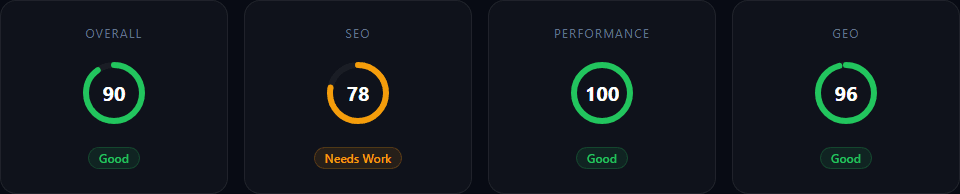
AuditAI checks all 14 SEO checks from this article in under 60 seconds - including H1, meta descriptions, alt text, canonical, Open Graph, structured data, and Core Web Vitals.
Frequently asked questions about SEO tests
What does an SEO test check?
An SEO test checks all relevant on-page factors of a website: title tag, meta description, H1 tag, image alt text, canonical tag, internal links, load time (Core Web Vitals), structured data, Open Graph tags, and other technical signals. A complete SEO test crawls not just the homepage, but up to 25 subpages.
How often should I run an SEO test?
After every major deployment, after content updates, and after Google core updates - at minimum weekly for active websites. SEO mistakes don't only come from intentional changes: a plugin update, a new image without alt text, or an accidentally set noindex directive can quietly cost you rankings. The more often you check, the sooner you catch problems.
What is the single most important SEO factor on a website?
There is no single most important factor - SEO is an interplay of many signals. But the three most common issues with the biggest impact are: missing or too-short meta descriptions, a missing or non-keyword-rich H1 tag, and poor Core Web Vitals (especially load times over 3 seconds).
Can I run an SEO test for free?
Yes. AuditAI offers a free SEO test with 14 checks - including title tag, meta description, H1, alt text, canonical, Open Graph, structured data, and more. The free plan allows 1 full audit per month with no credit card required.
How many of these mistakes does your website have?
AuditAI checks all 14 SEO checks in under 60 seconds - including the 10 mistakes from this article. Start without registration, sign up free for the full report with all scores.
The 2026 SEO Checklist in 15 Minutes
These 10 mistakes turned into a fixed check order: 6 phases, 24 points, 15 minutes - including GEO signals for AI visibility.
Don't just check once — track it automatically
SEO mistakes happen continuously: new pages without meta tags, images missing alt text after updates, accidental noindex. With SEO Automation you monitor your rankings and keywords automatically, every week.
- Weekly Google rankings
- Keyword ideas
- Competitor analysis
- Backlink overview